
An in-game spending budget helps kids connect digital purchases to real money. Before buying coins, gems, skins, or a season pass, agree on a dollar limit and who approves each purchase. A free download does not mean every part of the game is free.
Quick answer: Agree on a dollar limit for a set period (zero is a valid choice), decide where the money comes from and who approves each purchase, convert every coin or gem price into real dollars before buying, and turn on purchase controls. Then review receipts weekly without punishment, so mistakes get reported instead of hidden.

Use this guide to practice the math, create a short family agreement, and review purchases together. A budget of zero is a valid choice. Children can learn the same skills by comparing hypothetical purchases without buying anything.
Why in-game spending needs its own budget
This is not a niche problem. In an August 2024 consumer advisory, the Consumer Financial Protection Bureau cited an estimate that 45.7 million U.S. children play video games, more than 80% of kids ages 5 to 18. The CFPB warned that in-game currencies can hide real costs through confusing exchange rates, and that loot boxes and similar features use gambling-like design.
Regulators have acted on it. In a 2022 settlement, the Federal Trade Commission required Epic Games to pay $245 million to Fortnite players it said were charged unfairly, including cases where kids could buy items without a parent confirming the purchase. A family budget won’t fix game design, but it gives your child a plan to follow when the shop screen is designed to rush them.
Build an in-game spending budget in real dollars
Start with the amount your household can afford for optional entertainment. Then decide whether game purchases come from that amount, a child’s allowance, or a separate gift. Do not count the same money in two places.
For example, suppose a teen has $20 for optional spending this month. They want a $12 game item and an $11 outing with friends. Both choices would cost $23, so one needs to change. Ask which experience matters more, whether either can wait, and what they would give up. The aim is to compare choices before paying.
Write down the next review date. If the limit is monthly, say when the month starts and whether unused money carries forward. Avoid automatic top-ups that make an agreed limit disappear.
Turn virtual currency into a price you can understand
Game currencies can hide the connection between a tap and a bank charge. Use a made-up example first: a pack of 1,000 gems costs $10 before tax. That makes each gem cost one cent. An item priced at 650 gems uses $6.50 worth of that pack.
However, if you have no gems and must buy the whole pack, the checkout cost is $10, not $6.50. You would have 350 gems left afterward. Those unused gems do not become cash in your pocket. Do not treat them as a reason to buy another pack.
- Find the real-money price of the currency pack.
- Divide the pack price by the number of currency units.
- Multiply that unit cost by the item’s virtual price.
- Check the actual checkout total, including any applicable tax and required pack size.
- Compare the cash leaving the account with the budget remaining.
These figures are an exercise, not a quote for any particular game. Bundles, bonus currency, and prices vary. If a larger pack offers a lower unit price, ask whether the family actually planned to spend the larger amount. A lower unit price does not make an unplanned purchase affordable. For a bigger item, Can My Child Afford It? turns the price into a weekly savings target.
Worked example: when the cheaper-per-coin pack costs more
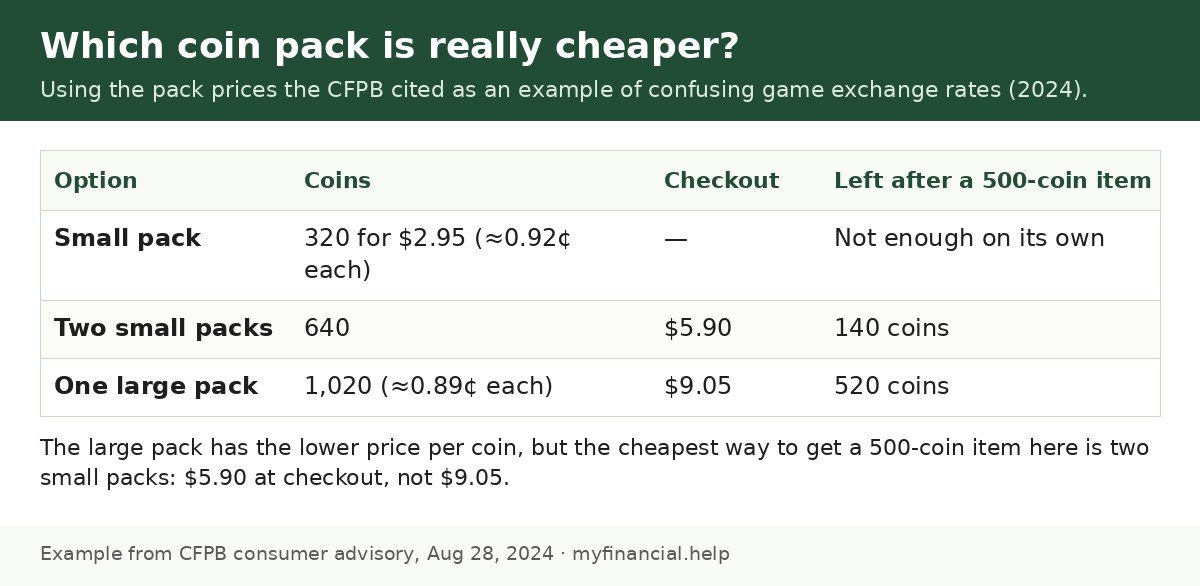
The CFPB gave this real-world style example of confusing pack pricing: 320 coins for $2.95 or 1,020 coins for $9.05. The big pack is cheaper per coin (about 0.89 cents vs. 0.92 cents). But suppose your child wants an item that costs 500 coins:
- One small pack (320 coins) is not enough.
- Two small packs give 640 coins for $5.90, leaving 140 coins.
- One large pack gives 1,020 coins for $9.05, leaving 520 coins.
The lowest checkout cost is $5.90, even though the large pack “wins” on price per coin. Leftover coins are designed to nudge the next purchase. Ask your child: “Which option spends the least real money for what you actually want?”
Walkthrough: turn a bigger item into a savings plan
For items that don’t fit this month’s limit, our free Can My Child Afford It? planner turns the price into weeks of saving. Example inputs (illustration only): item price $20 (a season pass, at checkout), already saved $6, saving $2 a week. The tool returns $14 still needed and 7 weeks to the goal, plus a reminder to compare options before buying. Seven weeks is also a built-in cooling-off period: if the pass no longer matters by then, the money is still there.
Match purchase controls to your family rules
The FTC’s guidance on kids and video games explains purchase restrictions and child profiles. Depending on the platform, controls may block purchases, require a password, or set a spending limit. Check the device maker’s or game’s current instructions; settings differ.
Use the child’s own age-appropriate profile where available, and keep the adult approval credential private. Review the setup together after a new device, account, or game update. Controls support a conversation, but they do not replace one.
The CFPB adds three practical options: avoid storing your debit or credit card on a child’s gaming account, use a gift card with a fixed amount if the platform requires a payment method, and turn on bank alerts so repeated game charges stand out.
Purchase rules by age
| Age | Who buys | Payment method | Suggested rule |
|---|---|---|---|
| 6–8 | Adult only | No card stored on the account | Purchases blocked or password-protected; practice with pretend prices |
| 9–12 | Child asks, adult approves every time | Gift card or approval request | Show the item, the dollar total, and the balance left before approval |
| 13–15 | Teen decides within a monthly limit | Fixed-amount gift card or teen account with limits | A waiting period for anything over a set amount; no random-reward purchases |
| 16–17 | Teen manages own game budget | Teen’s own money, with alerts | Monthly review of purchase history and any renewals |
These are starting points, not rules. Platform age requirements and controls differ, so check the game’s and device maker’s current settings.
Copy this in-game spending agreement
Fill these lines in together. Keep the wording short enough that your child can explain it back to you.
- Our limit: We may spend up to $___ on game purchases from ___ to ___.
- Where it comes from: This money comes from ___, and it also counts toward ___.
- Approval: Before any purchase, we show ___ the item, the dollar total, and the balance left.
- Waiting: We wait ___ before buying an optional item. A countdown does not change this rule.
- Carryover: Unspent money ___ at the end of the period.
- Renewals: We record any renewal date and decide who checks it before the next charge.
- Mistakes: We tell an adult promptly, save the receipt, and review what happened.
For younger children, an adult can handle all purchases. For an older teen, practice checking the balance and explaining the tradeoff before you consider more independence. The right amount of freedom depends on the child and the account’s rules.
Our Game-Spending Agreement
Suggested ages 9–17 · PDF · 2 pages
Agree on purchase limits and practice converting virtual currency to real cost.
Handle countdowns, bundles, and random rewards
Ask your child to pause on the purchase screen and answer: “What exactly do I get? Is it guaranteed? Can I still enjoy the game without it?” If the purchase offers a random reward, compare the price with what is guaranteed, not only the best possible prize. A family rule can simply exclude purchases with uncertain rewards.
Next, ask whether the item would still appeal without a timer or friends talking about it. A purchase that expires before your waiting period ends can be allowed to expire. A budget is permission to choose among affordable options, not a requirement to spend the full amount.
For recurring game passes, use our teen subscription checklist. For suspicious links or requests to pay outside the platform, see our online shopping and payment-app safety guide.
What to say when your kid says…
- “Everyone else has the battle pass.” “It might feel like everyone. Let’s check what it costs in dollars and whether it fits your limit this month.”
- “It’s only 99 cents!” “Small prices add up. Let’s count how many 99-cent buys happened last month.”
- “The sale ends in two hours!” “Our waiting rule still applies. If it’s gone, there will be another offer, and your money will still be yours.”
- “Can I use your card just this once?” “No. Purchases come from your game budget so we can both see what’s left.”
- “I didn’t mean to buy it.” “Thank you for telling me right away. Let’s look at the receipt and contact support together.”
Review receipts without turning mistakes into secrecy
Once a week, compare the purchase history with your agreement. Ask what was worth the money and what your child would skip next time. If an unexpected charge appears, check the account and receipt together. Contact official platform support promptly to ask about available options; do not promise a refund or make a false claim.
If the child made an allowed purchase and now regrets it, use our guide to an allowance spent too soon to discuss the next choice. Update the in-game spending budget if a rule was unclear, then set a date to practice again.
Printable in-game purchase setup checklist
Print this section or copy it into your notes app.
- ☐ Decide the limit and period (zero is fine)
- ☐ Decide where the money comes from (allowance, gift, or separate)
- ☐ Child uses their own profile, not an adult account
- ☐ Purchases blocked, password-protected, or capped on each device
- ☐ No debit or credit card stored on the child’s game account
- ☐ Bank or card alerts turned on for game charges
- ☐ Waiting rule written down (for example, 48 hours)
- ☐ Rule on random-reward items (loot boxes) agreed
- ☐ Weekly receipt check scheduled
- ☐ Renewal dates for any game pass written down
Sources
- Federal Trade Commission: Kids and Video Games
- Federal Trade Commission: FTC helps Fortnite players score a victory royale against Epic Games (Dec. 2022)
- Consumer Financial Protection Bureau: Video games are targeting your children to get into your wallet (Aug. 2024)
- Consumer Financial Protection Bureau: Money as You Grow
This article is for educational purposes and does not provide individualized financial, tax, legal, or investment advice. Example numbers are illustrations, not recommended amounts.




Leave a Reply